Official Release of v1.0.0
On January 11, 2026, we are excited to announce the official release of version v1.0.0, as Eink Mode transforms from an individually developed project into a collaborative effort by the BacInk startup team. We hope that through the integration of various skills among team members, we can continue to drive the development and innovation of Eink Mode, accelerate version updates, and enhance product quality to provide users with a better experience.
Feature Showcase
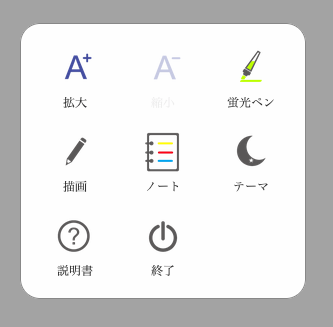
Multilingual Support - Supports 11 language interfaces
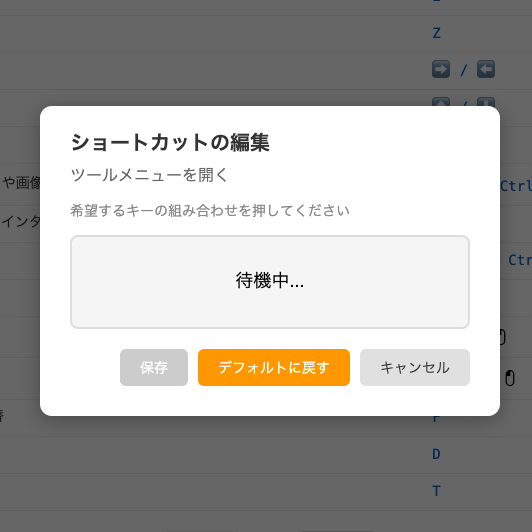
Custom Shortcuts - Set according to personal habits
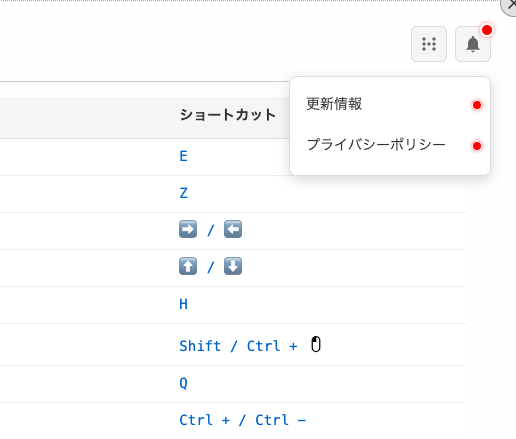
Notification Bell - Receive updates instantly
New Features
This update includes several anticipated new features:
- Multilingual Support:We have added support for multiple languages, allowing users of different languages to conveniently use Eink Mode to browse the web. The currently supported languages are: Traditional Chinese, Simplified Chinese, English, Japanese, Spanish, German, Russian, French, Portuguese, Arabic, and Indonesian, totaling eleven languages. We will continue to expand support for more languages to allow users to use Eink Mode in a more familiar language environment.
- Custom Shortcuts for Desktop: In the user manual for Eink Mode, we have optimized the way shortcuts are presented, making it clear at a glance. Additionally, users can customize some of the shortcuts: if the mouse cursor moves over the shortcut position and an edit icon appears, you can click and edit the shortcut! This feature allows users to set shortcuts according to their own usage habits, enhancing convenience and efficiency in operation, and also addresses potential conflicts between Eink Mode’s default shortcuts and native browser shortcuts or shortcuts from other browser extensions.
-
New Shortcuts: Allowing users to operate Eink Mode more conveniently.
- Exit Eink Mode: Default
Q(quit) - Open Drawing Tool: Default
P(paint) - Show Tool Menu: Default
Z - Display User Manual: Default
M(manual)
- Exit Eink Mode: Default
- Notification Bell: We have added a bell icon with a red dot to indicate new messages, allowing users to receive important reminders and version update news in real-time, enhancing the user experience.
Bug Fixes
- Fixed an issue where the webpage could not revert to its original layout when entering scroll mode.
- Improved the page flipping speed when quickly scrolling using the mouse wheel.
- Improved the occasional freezing issue of webpages.
- Improved abnormal fullscreen switching issues.
- Improved issues with many website interactive elements not being clickable.
- Fixed an issue where mobile devices could not switch to Eink Mode when browsing desktop versions of websites.
Performance Improvements
- Enhanced the ad removal effect.
- Strengthened and improved the transition rate between black and white backgrounds.
- Enhanced the readability between consecutive webpages within the same site.